


Google Analytics 360 + Google BigQuery for Predictive Digital Marketing

Google
Analytics 360, the full featured website traffic analytics tool, has
been integrated with BigQuery. That means you can have full-resolution
Google Analytics logs automatically imported to your BigQuery project
several times per day. You can fully utilize this data to realize
predictive digital marketing - with better insight into your customers'
activities.
You may be asking yourself the question: "I already have Google Analytics 360, why do I need BigQuery?"BigQuery
offers a fully-managed data analysis service that's fast and scalable
for big data analytics. With BigQuery you can gain additional customer
insight by combining multiple data sources and performing advanced
statistical analysis, operating on your unsampled Analytics data which
enables hit-level analysis and still returns your results in seconds.
Note: This
article provides a high level overview of how to get started with the
Google Analytics 360 + BigQuery integration. For a more in-depth Code
Lab and Implementation Guide, check out the tutorial.Fully managed, scalable and customizable platform for Predictive Digital Marketing
Imagine
a world where you can optimize your digital marketing activities such
as product marketing decisions, digital ads, and direct mail delivery -
and have them based on deeper insights into your customers. You could
find the customer who recently visited your web site, has a certain
amount of historic spend with your e-commerce solution or in your
physical stores, and has shown behaviour similar to previous high-profit
customers. You may want to focus on such high ROI customers to realize
an effective "more-with-less" digital marketing strategy.
This
may sound hard to put into practice, but in reality, many companies
already have sufficient data within their Google Analytics logs,
corporate databases, or CRM systems to realize this aspiration. The only
missing piece is a way to link and correlate those data sources in a
scalable, timely, and cost-effective way to extract intelligence for
optimized digital marketing.
Now,
Google delivers the missing piece: Google Analytics 360 and Google
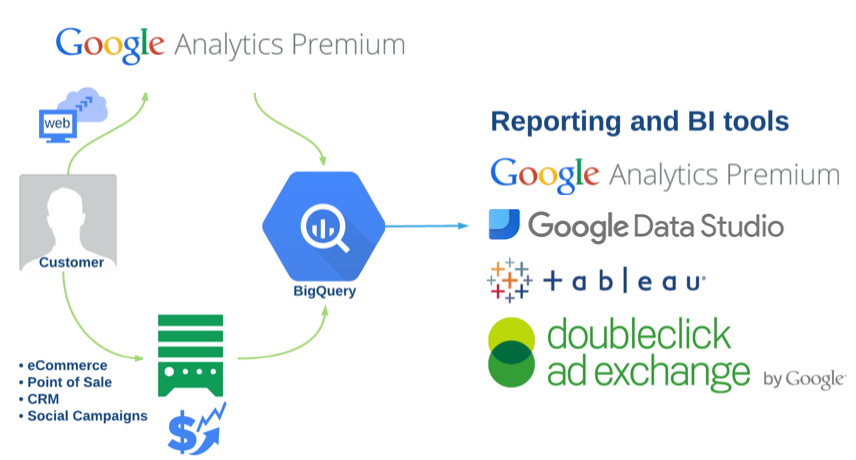
BigQuery integration. By automatically importing unsampled logs from
Google Analytics 360 to Google BigQuery, you can easily write SQL
queries to correlate your website visitor activity with other valuable
business data such as point-of-sale records, online purchase history,
and user sign-in logs. Using this combined insight into your customers,
you can then generate customized Ad Remarketing data for Google AdWords
and DoubleClick.
Benefits of Google Analytics 360 + Google BigQuery Integration
Unsampled, detailed Analytics logs automatically imported to BigQuery
The
integration allows you to automatically import unsampled, hit-level
Google Analytics 360 logs to Google BigQuery, the Google-scale and
Google-speed fully managed query engine, several times per day. This
feature allows you to easily track every single activity of millions of
users and execute in-depth, ad-hoc analysis in seconds, without being
worried about the scalability and availability of the data management
platform.
Correlating Analytics logs with corporate databases/CRMs on Google BigQuery to create the customer list of the future
The
power of BigQuery is in the ability to import, join, and correlate
every single row of massive user activity logs from different sources
with each other to extract valuable intelligence from them. In addition
to Analytics logs, BigQuery integrates with other Google Cloud Platform
services like Cloud Dataflow, and supports third party toolsfor
importing a wide variety of business data from existing corporate
databases and CRM systems. By linking Analytics log data with your
website registration forms, shopping carts, inquiry forms or any
customer interactions, you can easily correlate those transactions with
customer website behavior to answer questions such as "who are the
customers who have a certain spend history in the past and not visited
our site for some time?", and "what was the average customer spend by
source media (Search Ads, Social Ads, e-mail, organic search etc.) in
the last marketing campaign?" These insights can increase the ROI of
digital marketing dramatically.
Accelerates scientific data analysis for Predictive Digital Marketing
Standard tools for data scientists such as Google Data Studio,
R, Tableau, and the Hadoop ecosystem are the best friends of BigQuery
and can be tightly integrated with each other for sophisticated data
analysis beyond simple correlations and table joins. One example is a
technique known as Audience Extension, used in digital marketing to find
potential customers who have a certain quantitative similarity to
existing high-profit customers in terms of on-site behavior and various
customer attributes. BigQuery can quickly aggregate and filter massive
datasets for in-depth regression analysis with R. In short, Analytics +
BigQuery + R provides an excellent platform for data scientists to
realize a new predictive digital marketing approach.
Getting Started with Google Analytics 360 + BigQuery
In
this section you will learn about the general process to take full
advantage of the Google Analytics 360 + BigQuery integration. When you
feel you have a good understanding of the overall flow, you can try your
hand at the tutorial that will walk you through all steps using an example scenario. At a high level, you will perform the following three steps:

Setup Google Analytics 360
To
setup your Google Analytics 360 account with automatic integration to
BigQuery, follow the instructions below. This may take a few days
depending on what services you are already subscribed to. You may also
need help from someone with administrative access to your website.
- Sign up for Google Analytics 360: Submit the signup form and our sales representative will walk you through the subscription process. After completing the process, you will receive a notification from the sales representative that you have successfully been signed up for Google Analytics 360
- Configure your website to use Google Analytics: If you're not using Analytics on your website already, you need to enable it
- Create a new project and open the BigQuery Browser tool: Open the Google Cloud Platform Console and press [Create Project]. Open the project and click [Big Data] - [BigQuery] menu to launch the BigQuery Browser tool and take note of your Project ID
- Reach out to your Google Analytics 360 Account Manager to submit a BigQuery export request with your Project ID: Your account manager will take care of your BigQuery export request and will give you a monthly credit of USD $500 towards usage of BigQuery for this project
- That's it! You will see your Google Analytics logs imported into your project several times per day, with BigQuery tables named ga_sessions_YYYYMMDD
Link Google Analytics and CRM data
Google
Analytics provides detailed information about your website visitors,
including what page was visited, which browser they used, and how long
they stayed on each page. You can run reports and learn a lot about your
visitors by simply using the reporting that is made available
out-of-the-box, but you can obtain much more insight if you combine this
data with other information that is stored within your own internal
databases, such as customer demographics and what purchases they have
made before.

To
achieve this goal, you need to have some way of linking the website
visitor with a specific entry in your internal database. Google
Analytics provides a unique identifier called the Client ID for each visitor, that can be used to tie two databases together. It is important to note that you should never save personally identifiable information (PII)in Google Analytics.
Analyze the Data
After
you have signed up for Google Analytics 360 + BigQuery integration, you
will automatically see the Analytics logs become available in BigQuery.
However, you will need to import your internal data sources to BigQuery
using one of several options to quickly and easily load your data.
Once
the data is loaded into BigQuery you can clean it up based on your
specific requirements. In particular, it is important to choose which
relevant variables you will include in your analysis, and which should
be excluded. BigQuery includes many powerful functions that may be
sufficient for you to create a remarketing list. However, if you want to
perform more advanced statistical analysis like regressions, you can
use third party tools that integrate directly into BigQuery to run the
regression.
Finally,
when you have completed your detailed analysis and generated a list of
prioritized web visitors that you'd like to reach out to, you can import
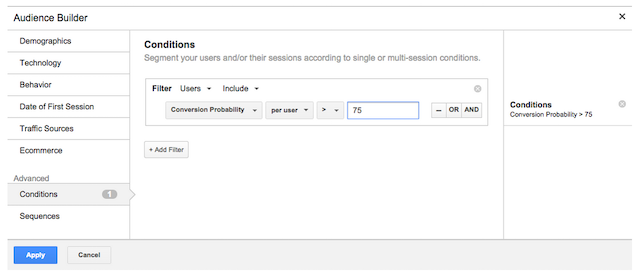
that list of Client IDs into Google Analytics and build an audience for
your new Remarketing Campaign.
In the screenshot above, you can see an example of creating an audience
that will only include visitors who have a conversion probability of
75% or more based on your statistical analysis. To find out how you can
do the same, follow the detailed tutorial on how to create a remarketing list with predictive analytics.

No comments